
Program types
Five ways to reward a return visit
Every program type runs on the same counter screen — the one your staff already use to scan a pass. Here’s exactly what it looks like for each one, live preview and all.
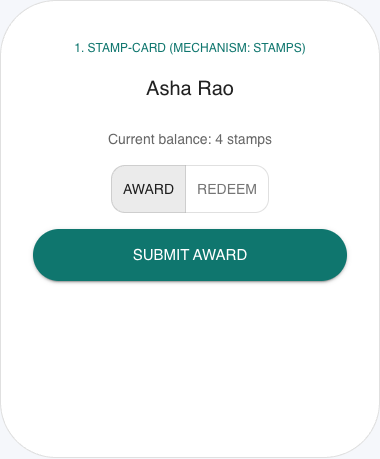
Stamp Card
Buy N, get one free. Stamps collect on the pass in Apple Wallet or Google Wallet.
Staff scan the member's pass and tap Award — no amount to type, since every visit is worth exactly one stamp. Redeem asks for a whole-number amount when a member is cashing in stamps for a reward. The balance on the screen and on the wallet pass always match, since it's the same ledger.
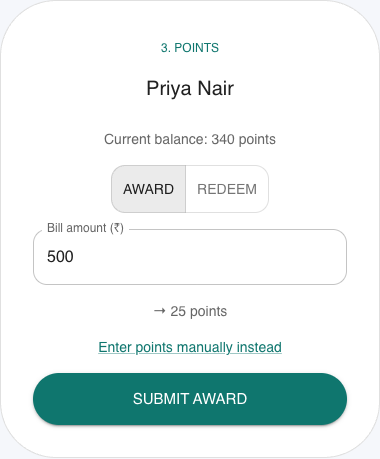
Points
Earn points per spend and redeem at a threshold you set.
Staff type the bill amount in ₹, not the points — the screen converts it live at the rate you configured (₹500 at 5 points per ₹100 shows “→ 25 points” before anyone submits). A manual-entry link is always available for the rare case staff need to award a specific points number directly.
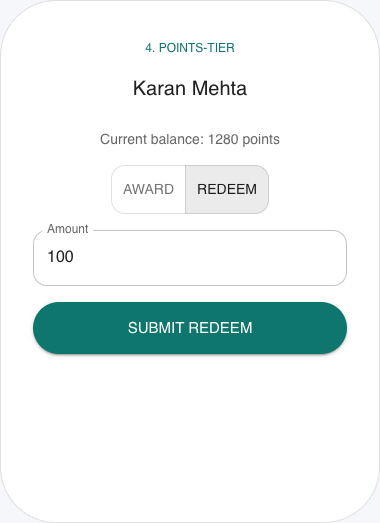
Points + Tier
Points for everyday rewards, plus Bronze / Silver / Gold style perks.
Runs on the same points engine as Points, so Award behaves identically. The tier perks apply automatically as the member's yearly points cross your configured thresholds — no separate action for staff to take.
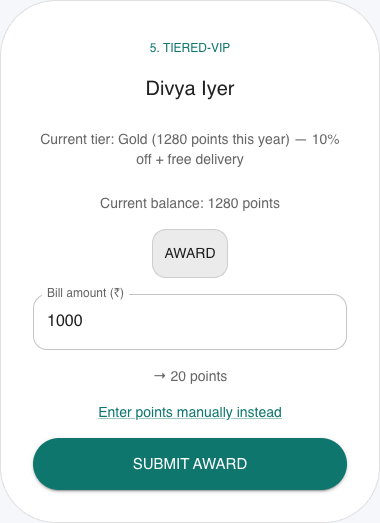
Tiered VIP
Named tiers with perks. Members see their status on the pass they already open.
The screen shows the member's current tier and this year's points right above the action picker, so staff can recognize status at the counter. There is no Redeem toggle — tier perks aren't a balance to spend down, so only Award appears.
Cashback
A percentage back as wallet credit after qualifying visits.
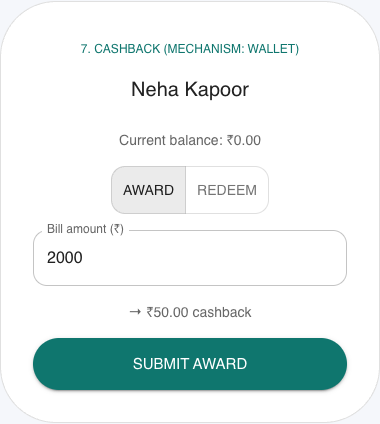
Staff enter the bill amount and the screen previews the cashback that will land in the member's wallet at your configured rate (₹2,000 at 2.5% shows “→ ₹50.00 cashback”) before anyone taps submit.
Not sure which one fits your counter?
Tell us how you run visits today and we’ll match you to a program type.
Start a program